 AppLocker
How to see who tried to open your apps
Suspect someone has been looking through your phone? Here's how to find out, and how to catch it next time.
First, look for signs
Android doesn't keep a log of who opened which app, but it leaves a few clues:
- Recent apps: open the recent apps view and look for apps you don't remember using.
- Screen time: most Android phones show how long each app was used today, under Digital Wellbeing or a similar screen-time page in Settings. Usage at a time you weren't using your phone is a giveaway.
- Messages marked as read that you never opened.
These tell you that something happened, not who did it.
Catch the next attempt with Intruder Selfies PRO
AppLocker locks your chosen apps behind a PIN or pattern. With AppLocker Pro, a wrong attempt doesn't just fail:
- Intruder Selfies takes a front-camera photo of whoever got the PIN wrong.
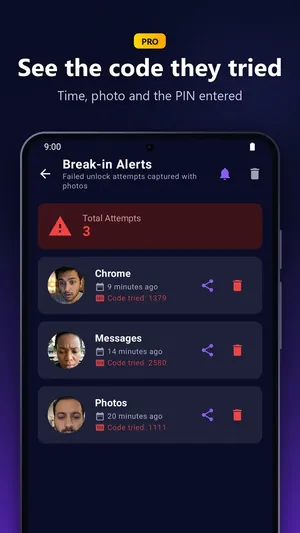
- Break-in Alerts keep a record of every failed unlock attempt, with the time and the app.
- Break-in evidence+ shows the code they tried and lets you export the photo evidence.
Set it up
- Install AppLocker from Google Play and lock the apps you want to protect.
- Turn on Intruder Selfies in AppLocker. It asks for camera permission, which it uses only for this feature.
- Leave your phone as usual. If someone tries the wrong PIN, you'll find their photo and attempt in Break-in Alerts.
Make your lock harder to beat
- Pick a PIN that isn't your birthday or 1234. Guessers try those first.
- Wrong-PIN pause (free): after several wrong PINs in a row, PIN entry pauses for a short time, which slows guessing down.
- Scrambled keypad PRO: the digits move on every lock screen, so nobody learns your PIN by watching your finger.
- Uninstall Protection (free): stops someone from simply removing AppLocker.
- Lock system screens PRO: Settings, the Play Store and the app installer ask for your PIN too.
Use these features on your own phone, to protect your own apps. Photos of people are personal data, so treat any you capture with care.
Try AppLocker free
Lock up to 3 apps with a PIN or pattern. No account, no Accessibility service.
Get it on Google Play